CommonWatch Continuity
Business continuity management on ISO 22301, kept current by the server.
Business impact analysis, dependencies, plans, incidents, exercises and corrective actions in one Microsoft environment your service governs. Plans come from the BIA, so a changed dependency marks every plan it touches for review.
Book a demoWho it is forContinuity coordinators, process owners and responders at police services and public bodies.
+
Continuity coordinators, process owners and responders at police services and public bodies.
CommonWatch Continuity is for the business continuity coordinator who runs the programme, the process owners who keep their business impact analysis current, and the responders who act on a plan during an incident: communications centres, records, property and evidence, fleet and IT.
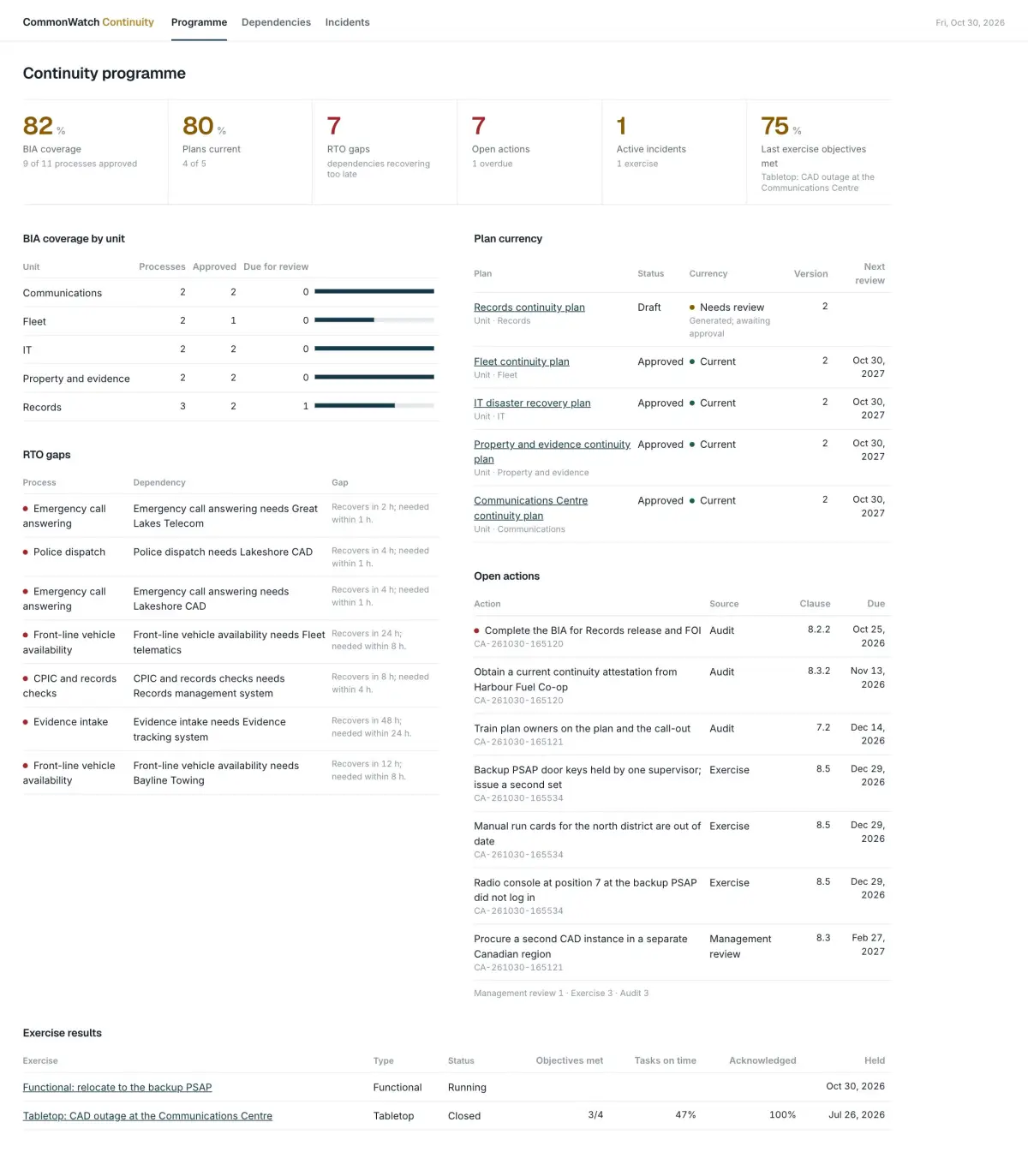
Business impact analysisBIA and dependencies in one model, with RTO gaps flagged.
+
BIA and dependencies in one model, with RTO gaps flagged.
- Processes with MTPD, RTO and RPO. The server refuses an RTO longer than the maximum tolerable period of disruption, and impact ratings that fall over time.
- One dependency graph. People, applications, facilities, suppliers and records are resources. Processes depend on resources and on other processes. Staff and groups import from Microsoft Entra ID.
- RTO gaps. A resource or upstream process that recovers later than the process needs is flagged, and the gap count sits on the process.
- Supplier continuity. Suppliers are resources with their own continuity attestations and review dates.
PlansPlans generated from the BIA, versioned and marked when they go stale.
+
Plans generated from the BIA, versioned and marked when they go stale.
Generate builds a plan for a unit, site or system from the BIA and the dependency graph: processes in RTO order, their dependencies, minimum resources, owners, strategies and recovery steps. Each version is fingerprinted and records the BIA it came from.
A change to a process (MTPD, RTO, RPO, minimum staff or resources) or to a dependency marks every plan covering it Needs review, with the reason. Approval stamps the date, version and next review. Approved plans export to PDF for offline copies.
IncidentsActivate a plan and its steps become tasks, with a call-out and a log.
+
Activate a plan and its steps become tasks, with a call-out and a log.
- Task board. Activating an incident with a plan opens one task per plan step, due from the declared time.
- Call-out. Send call-out phones each recipient through the CommonWatch phone line and sends a text. Press 1 or reply YES records the acknowledgement once, with time and channel.
- Incident log. Entries are append-only and fingerprinted. A decision needs its rationale.
- Responder site. Responders sign in with Microsoft Entra ID to see today's tasks, their BIA and plan, check in and acknowledge.
Exercises and improvementExercises write their own after-action report.
+
Exercises write their own after-action report.
An exercise runs as a simulated incident with timed injects. Closing it writes the after-action report from the record: objectives met, task times against targets and acknowledgement rates. Each observation becomes a corrective action.
Corrective actions from exercises, incidents, internal audits and management reviews sit in one register (ISO 22301 clause 10). Each needs a source, owner and due date, and closing one needs evidence. A nightly sweep marks overdue BIAs, plans, supplier attestations, actions and expired training.
Procurement factsISO 22301 coverage, data residency and sign-in.
+
ISO 22301 coverage, data residency and sign-in.
- ISO 22301:2019. Programme and policy (clauses 4 to 6), training and awareness (7.2, 7.3), BIA and risk assessment (8.2), strategies (8.3), plans and incident response (8.4), exercises (8.5), internal audit and management review (9.2, 9.3) and corrective action (10).
- Canadian data residency. Installed in your own Microsoft tenant, or hosted by Two Rivers Digital, on Microsoft Dataverse in Canadian regions.
- Roles. Coordinator, Process Owner, Responder and Read-only.
- Single sign-on. Staff and responders sign in with Microsoft Entra ID under your multifactor and conditional access policies.
- Modular. Continuity installs on its own or next to CommonWatch FOI, Recruit and Complaints.
Common questions
What is CommonWatch Continuity?
CommonWatch Continuity is business continuity management software for police services and public bodies, built by Two Rivers Digital on Microsoft Dataverse. It holds the business impact analysis, dependencies, plans generated from the BIA, incident call-out, exercises and corrective actions in one place.
Which ISO 22301 clauses does CommonWatch Continuity cover?
Programme and policy (clauses 4 to 6), training and awareness (7.2, 7.3), BIA and risk assessment (8.2), strategies (8.3), plans and incident response (8.4), exercises (8.5), internal audit and management review (9.2, 9.3) and corrective action (10) of ISO 22301:2019.
How does a continuity plan stay current?
Plans are generated from the BIA and the dependency graph. When a process's MTPD, RTO, RPO, minimum staff or a dependency changes, every plan covering it is marked Needs review with the reason, and a nightly sweep marks overdue BIAs, plans and actions.
Where is the data hosted?
In your own Microsoft tenant or hosted by Two Rivers Digital, on Microsoft Dataverse in Canadian regions. Staff and responders sign in with Microsoft Entra ID.
Published · Updated