CommonWatch Recruit
Applicant tracking built for police recruiting.
Track applicant data throughout the recruitment process and across multiple applications, see where applicants drop off, and give applicants one place to apply, upload, book and follow their file.
Book a demoWho it is forRecruiting units at police services and public bodies.
+
Recruiting units at police services and public bodies.
CommonWatch Recruit is for recruiters, recruiting managers and assessors who move sworn, communications, auxiliary and civilian applicants through screening, testing, interviews, background and the final panel.
Applicant experienceApply, upload, book and follow the file in one portal.
+
Apply, upload, book and follow the file in one portal.
- Application. Four steps: details, documents, review and submit. The server refuses submission until required details and documents for the category are in.
- Documents from a phone. Take photos, cropped and combined into one PDF on the phone before upload.
- Where am I. The applicant sees each stage, the current one, its typical wait and the next step.
- Self-booking. Applicants book and cancel sessions for their stage, with a calendar file. Full sessions and second bookings are refused.
- Messages. Application received, next step, returned document, booking and reference request, from approved, versioned templates.
Screening and assessmentStages per category, locked test results and blind panels.
+
Stages per category, locked test results and blind panels.
- Stages per category. Configurable stages for each applicant category, moved in order by the server. Moving back needs a reason.
- SIGMA and POPAT results. Results can't be edited or deleted, even by an administrator. A correction is a new linked result with a reason.
- Blind panel scoring. Weighted rubrics. Each member sees only their own score sheet, declares any conflict of interest before scoring, and submitted scores are locked. The panel is revealed when every member has scored.
- References. Referees get a single-use invitation and answer a structured questionnaire. Answers lock on submission.
- Document expiry. Validity per document type, flagged when a document expires before the planned start.
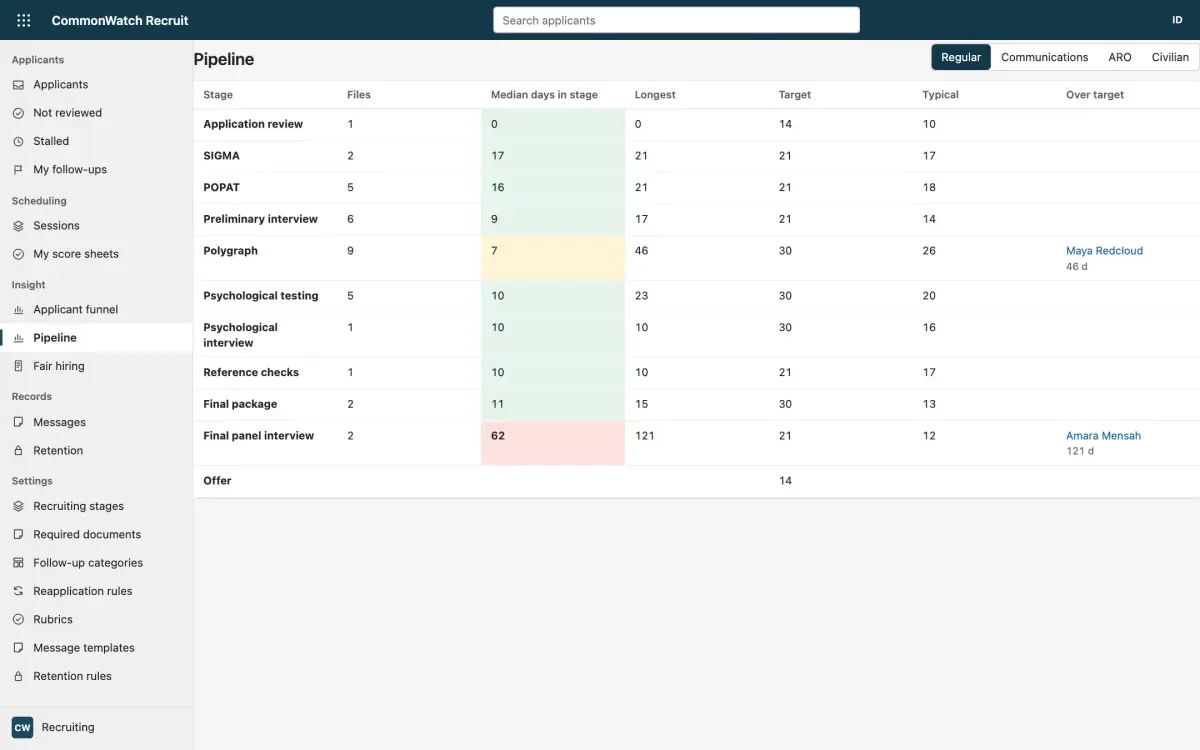
Drop-off and pipelineWhere applicants exit, and which files have stalled.
+
Where applicants exit, and which files have stalled.
- Funnel by year. Volumes and the stage where applicants exit, by category.
- Pipeline. Median and longest days in each stage against a target. Files over target are marked stalled, and each recruiter gets a morning digest.
- Fair hiring. Voluntary self-identification that no staff role can read. Managers see pass rates at each stage by group with the four-fifths ratio. Groups under five are never shown.
- Follow-ups. Flags with categories, owners and due dates, and a Not reviewed queue.
Records and auditOne applicant file across every application.
+
One applicant file across every application.
- Reapplication. Earlier files are linked. A second open file is refused, and a manager-set wait after an unsuccessful exit is enforced.
- Notes. Append-only, with restricted text in a secured column.
- Access log. Opening a file, exports and downloads are logged. Exports to CSV, Excel and PDF follow the current filters.
- Retention. Rules per outcome. Disposal keeps a record with a SHA-256 fingerprint.
- Hosting. In your own Microsoft tenant, or hosted by Two Rivers Digital, on Microsoft Dataverse in Canadian regions. Staff sign in with Microsoft Entra ID.
Common questions
What is CommonWatch Recruit?
CommonWatch Recruit is applicant tracking software for police services and public bodies, built by Two Rivers Digital on Microsoft Dataverse. It covers the applicant portal, stages per applicant category, SIGMA and POPAT results, blind panel scoring, references, drop-off reporting and retention.
Can SIGMA and POPAT results be changed after they are entered?
No. Results can't be edited or deleted, even by an administrator. A correction is a new result linked to the original, with a reason.
How does it show where police applicants drop off?
A funnel by year shows volumes and the stage where applicants exit, by category. The pipeline shows median and longest days in each stage against a target, marks stalled files and sends each recruiter a morning digest.
Where is applicant data hosted?
In your own Microsoft tenant or hosted by Two Rivers Digital, on Microsoft Dataverse in Canadian regions. Staff sign in with Microsoft Entra ID.
Published · Updated